How does the health check work?
- Purchase the health check online today and we will send you our health check kit within 3-5 working days
- Plug in the Airthings Space Hub
- Position the Airthings Space Plus wireless sensors around your building in the areas you would like to monitor
- Monitor your air quality data in real time using the Airthings Business Dashboard
- Run reports weekly, monthly or after 90 days to see what's in the air you breathe
- After 90 days we will collect the health check kit, but if you would like to keep monitoring your indoor air quality we will give you a £100 credit against any Airthings sensors you buy
How do I install the Airthings indoor air quality health check kit?
Here is a step-by-step guide:
- You will receive an invitation email to setup your Airthings Business Account when you purchase an Airthings Space Hub. Set up your account using the on screen instructions. If you do not receive this (check your spam folder), please contact info@evotechairquality.co.uk.
- Log onto dashboard.airthings.com. In the menu on the left, go to buildings and add your building(s) and device(s). For more details about this, read this article.
- Follow the on-screen instructions to register your Space Hub which should be done first.
- Remove your Airthings Space Hub from its box, connect the power supply into a suitable mains power outlet, following which the green cloud icon on the Hub will be lit. The Hub(s) will now connect to the Airthings Cloud and download any firmware updates available.
- Now register your Airthings Space Plus sensors in the dashboard. It can be helpful to put a label on them to identify the rooms where they are going to be installed (don't remove the battery tab on the sensor just yet!). For more details about this, read this article.
- Bring the sensors to the rooms where you want to install them, remove the battery tab, and install them as required. For more details about this, read this article.
- Wait up to 8 hours for the devices to connect to the Hubs and to start sending data to the Airthings Business Dashboard.
- If the device has not registered on the Dashboard then remove the batteries from the device, and replace them after a few minutes to reset the device. Wait a further 8 hours for the device to connect to the Dashboard.
The Hub has 3 lights and they all need to light up:
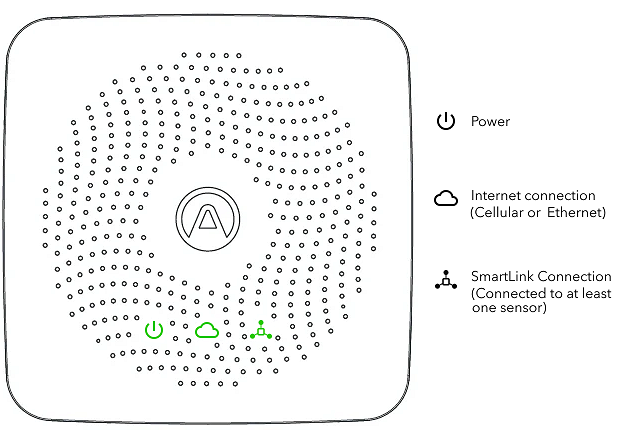
See the Airthings for Business Setup Guide for more information: https://www.airthings.com/business/setup
Good to know:
- The Airthings Space Hub can manage up to 30 devices, but we recommend maximising at 25 devices to ensure a robust network.
- It will take 7 days for the PM, TVOC, CO2 and Radon sensors to self-calibrate. During these 7 days, it should be allowed a best-case scenario (i.e. building is empty)
Where should I place my Airthings Space Hub?
Place your Hub:
- central to where you intend to place your sensor(s) to ensure best connectivity
- position near a mains power outlet
- place on a flat surface like a desk, table or cupboard top; or
- fix on a wall using a screw for permanent fitting, or use the included 3M adhesive strips
Where should I place my Airthings Space Plus sensor?
Place the sensor:
- where you would like to measure your indoor air quality! The device itself is recommended to cover (but not limited to) less than 50 square meters
- at an ideal height of between 1.1 - 1.70m (the Breathing Zone)
- on a wall using a screw for permanent fitting, or use the included 3M adhesive strips. For more details about this, read this article
Avoid placement in proximity to:
- large metal objects/cabinets
- doors or windows
- fresh air supply
- sources of heat (i.e. radiators) or humidity (i.e. showers)
- outer Walls
How is my Airthings Space Plus sensor calibrated?
All Airthings products are designed for long-time stability, and to minimise the need for on-site calibration. They intentionally avoid using sensors known for high drift, such as electrochemical cells.
Sensors are built to minimise drift over time, with most making use of smart algorithms that continuously correct for the effects of aging and mechanical stress.
See the Airthings for Business Calibration Guide here for more information.
What is the Airthings for Business SmartLink?
The communication protocol between Airthings sensors and the Airthings Space Hub is called SmartLink, which is a proprietary protocol designed by Airthings to ensure long range communication with a low power consumption footprint.
The frequency band, depending on the geographic location (due to local regulatory bodies such as FCC and ETSI), based on IEEE 802.15.4g with FHSS, 50kbps is:
- 865-895MHz (EU/ETSI)
- 902-924MHz (US/FCC)
Long range indoor connectivity is typically reliable through 3 thick concrete walls/floors or 10 drywalls in an office building (>1km Line of Sight). Robust link down to received signal strength indication (RSSI) of -90 dBm

How do I use the Airthings Business Dashboard?
Watch the Airthings Business Dashboard Demo at https://www.youtube.com/watch?v=RTbdchZGKeI
The Airthings Space Hub / Space Plus sensor is not working?
Here are some simple steps to take:
- Check the power lead / adaptor is correctly installed and working
- Reset the Space Hub / Space Plus sensor by disconnecting the power or batteries and then reconnecting it
- See the latest troubleshooting guidance from Airthings at https://help.airthings.com/en/collections/2024857-airthings-for-business#troubleshooting
- Contact us for further help at info@evotechairquality.co.uk
When will the Airthings health check kit be shipped?
Want to ask us a question?
Just email our team at info@evotechairquality.co.uk